Call us now on 0141 946 7355
or email: sales@smartboarddirect.co.uk
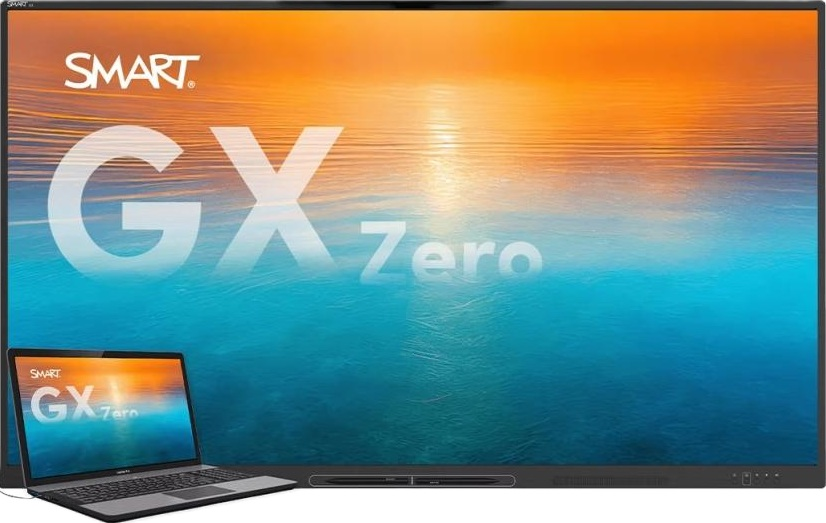
SMART Board GX Zero Series – Interactive Displays for Business
Discover the SMART Board GX Zero range from SmartBoardDirect – a new generation of professional interactive displays designed for business meetings, boardrooms, training rooms and collaborative workspaces.
Available in 65-inch, 75-inch and 86-inch screen sizes, the SMART GX Zero combines stunning 4K Ultra HD picture quality, advanced multi-touch technology and SMART Ink software in a simple, OS-free interactive display.
Unlike traditional interactive displays with an integrated operating system, GX Zero allows you to connect your own laptop or compatible room computer. This gives your organisation greater flexibility to use its preferred software, applications and existing IT environment.
One cable. One laptop. A more interactive way to work.
Whether you are upgrading an existing meeting room, replacing an older SMART Board GX Pro or equipping a new collaborative workspace, SMART GX Zero provides a flexible solution for professional environments.
SmartBoardDirect is a specialist UK supplier of SMART interactive displays, offering expert advice, competitive pricing, nationwide delivery and professional installation options.
[Request a quotation] | [Call 0141 946 7355]
The SMART Board GX Zero is designed to make interactive collaboration straightforward.
Connect a compatible laptop using USB-C and work directly with your familiar applications on the large interactive touchscreen. Alternatively, compatible SMART OPS computing modules can provide an integrated computing solution.
With no embedded operating system, GX Zero is particularly attractive to organisations that prefer to manage their own computers, software and security policies.
OS-Free Interactive Display
GX Zero has no built-in operating system. Connect your own laptop or use a compatible SMART OPS computing module to create the meeting room solution that suits your organisation.
4K Ultra HD Resolution
Enjoy detailed, high-quality images, presentations, documents and video with a 3840 × 2160 4K UHD display.
65-inch, 75-inch and 86-inch Models
Choose the right screen size for your meeting room, boardroom, conference facility or collaborative workspace.
Advanced Multi-Touch Technology
Supports up to 40 touch points with Windows, 20 with Mac and 10 with ChromeOS when used with the appropriate connected computer and SMART software.
SMART Ink Software
Write, draw, highlight and annotate directly on displayed content. SMART Ink supports working with documents and applications, including Microsoft Office and PDF files, with annotations retained in the original files where supported.
SMART Object Awareness
With a compatible computer and SMART Product Drivers, the display can distinguish between pen, finger and palm interactions, making writing, moving content and erasing more natural.
Single-Cable USB-C Connectivity
Connect a compatible laptop using USB-C for video, audio, touch and supported USB connectivity through one cable. Actual functionality depends on the connected computer and cable.
Powerful Integrated Audio
Two integrated 20W speakers provide 40W of audio output for presentations, video and multimedia.
Built for Everyday Business Use
A toughened, anti-glare bonded glass surface, ambient light sensor and rated LED lifespan of at least 50,000 hours make GX Zero suitable for regular professional use.
Energy Efficient
ENERGY STAR certification and ambient light sensing help support energy-conscious meeting room installations.
Many businesses already have established IT systems, managed laptops and security policies.
An interactive display with an additional embedded operating system may introduce another device that needs to be configured, maintained and managed.
SMART GX Zero takes a different approach.
Rather than providing its own built-in operating system, it allows your organisation to use its own compatible computer.
This offers several advantages:
Use familiar Windows, Mac or ChromeOS applications.
Keep software and application management within your existing IT environment.
Connect a laptop quickly using USB-C.
Avoid relying on an additional embedded operating system.
Use compatible SMART OPS computing modules where an integrated solution is preferred.
Support meeting room applications such as Microsoft Teams, Zoom, Google Meet and Webex through the connected computer.
The result is an interactive display that works around your organisation's preferred computing environment.
SMART Ink is one of the key advantages of choosing a SMART interactive display.
It allows meeting participants to write, draw, highlight and annotate content displayed on screen without interrupting the normal workflow.
Use SMART Ink to:
Annotate Microsoft Office documents.
Highlight important information in presentations.
Write notes during meetings.
Mark up PDF documents.
Explain diagrams and technical drawings.
Capture ideas during brainstorming sessions.
Make collaborative discussions more productive.
SMART Ink can also retain annotations in supported original Office and PDF files, helping teams capture decisions and meeting outcomes.
SMART Ink and SMART Product Drivers are used through the connected computer. Features and compatibility depend on the software and operating system.
GX Zero can form part of a complete professional meeting room solution.
Connect a suitable meeting room computer or laptop and use your preferred video conferencing platform, including:
Microsoft Teams.
Zoom.
Google Meet.
Cisco Webex.
The display provides the large interactive touchscreen, while compatible external conferencing equipment can provide the camera, microphones and additional room audio required.
SmartBoardDirect can help design a complete meeting room installation incorporating:
SMART GX Zero interactive display.
Microsoft Teams Rooms or compatible room computer.
Professional video conferencing camera.
Microphones and room audio.
Wireless presentation facilities.
Wall mounting or mobile display stand.
AV connectivity and control equipment.
The SMART GX Zero range is available in three screen sizes to suit different room layouts and viewing distances.
<escape>65"</escape> interactive display
An excellent choice for smaller meeting rooms, huddle spaces and collaborative work areas.
[View SMART GX065-V3-5A]
<escape>75"</escape> interactive display
A versatile screen size for standard meeting rooms, training facilities and professional presentation environments.
[View SMART GX075-V3-5A]
<escape>86"</escape> interactive display
A large-format solution for boardrooms, conference rooms, larger meeting spaces and training facilities.
[View SMART GX086-V3-5A]
| Specification | SMART GX Zero |
|---|---|
| Screen sizes | 65", 75", 86" |
| Display resolution | 4K UHD, 3840 × 2160 |
| Aspect ratio | 16:9 |
| Refresh rate | 60 Hz |
| Brightness | 400 cd/m² |
| Viewing angle | 178° |
| Touch technology | Advanced infrared |
| Touch response time | 8 ms or less |
| Touch points | 40 Windows / 20 Mac / 10 ChromeOS |
| Audio | 2 × 20W integrated speakers |
| LED lifespan | At least 50,000 hours |
| Operating system | None |
| USB-C | Video, audio, touch and supported USB connectivity |
| Glass | Toughened, anti-glare, bonded |
| ENERGY STAR | Certified |
Touch functionality and SMART Ink features depend on the connected computer, operating system and SMART Product Drivers.
The SMART GX Zero is the recommended replacement range for customers moving on from the SMART GX Pro series.
The GX Pro includes an embedded Android operating system, whereas GX Zero is designed around an OS-free approach using a connected laptop or compatible SMART OPS module.
If you currently use a SMART GX165, GX175 or GX186 and are planning an upgrade, GX Zero offers a different approach to computing and meeting room integration.
SmartBoardDirect can help you compare the models and check the compatibility of your existing installation.
Established in 2004, SmartBoardDirect specialises in SMART interactive display technology and supplies businesses and organisations throughout the UK.
We understand that choosing an interactive display is about more than comparing screen sizes and specifications.
Our team can help you select the right model, understand the available features and ensure the display is suitable for your intended application.
When you purchase from SmartBoardDirect, you benefit from:
An established UK SMART Board specialist.
SMART-trained sales and technical personnel.
Genuine SMART products.
Competitive UK pricing.
Specialist product advice.
Nationwide delivery.
Professional installation options.
Technical assistance and after-sales support.
Whether you need a single interactive display or are planning a complete meeting room installation, we can help.
The SMART Board GX Zero is an OS-free interactive flat-panel display designed for business, education and collaborative environments. It combines 4K UHD visuals, multi-touch interaction, SMART Ink and integrated speakers.
No. GX Zero is an OS-free display. You connect a compatible laptop or use a compatible SMART OPS computing module.
Yes. Microsoft Teams can run on a connected compatible laptop or room computer. The GX Zero provides the interactive display.
Yes. A compatible USB-C connection can carry video, audio, touch and supported USB connectivity. The exact capabilities depend on the laptop and cable.
The display supports up to 40 touch points with Windows, 20 with Mac and 10 with ChromeOS, subject to the connected computer and required SMART software.
Yes. SMART Ink and SMART Product Drivers are included for use with a compatible connected computer.
SMART Ink supports writing directly into supported Microsoft Office and PDF files, with annotations retained in the original files where supported.
SMART GX Zero is available in 65-inch, 75-inch and 86-inch models.
Yes. Compatible SMART OPS computing modules can be fitted to create an integrated computing solution. Check module compatibility before ordering.
Yes. It is designed for collaborative business environments, including meeting rooms, boardrooms, conference rooms and training facilities.
SmartBoardDirect can provide installation options, including wall mounting, configuration and integration with compatible AV and video conferencing equipment.
Looking for a professional interactive display for your meeting room, boardroom or business?
Speak to SmartBoardDirect for specialist advice on the SMART GX Zero range.
We can help you compare the 65-inch, 75-inch and 86-inch models, select the correct screen size and discuss installation and integration requirements.
SmartBoardDirect – Your SMART Board Specialists Since 2004.
Telephone: 0141 946 7355
Email: sales@smartboarddirect.co.uk
Request your quotation today.